


When do you actually need Superpowers?
You need Superpowers when the cost of an agent being fast but wrong is higher than the cost of slowing down for process.
That is the practical answer.
If the task is a one-line copy edit, a full methodology may be unnecessary. But if the task touches multiple files, changes product behavior, affects deployment, involves a bug, or needs verification, process matters.
Superpowers is useful because it gives the agent a library of specialized skills. The agent does not have to treat every task the same way. A bug should trigger debugging behavior. A new feature should trigger design and planning behavior. A finished branch should trigger verification and handoff behavior.
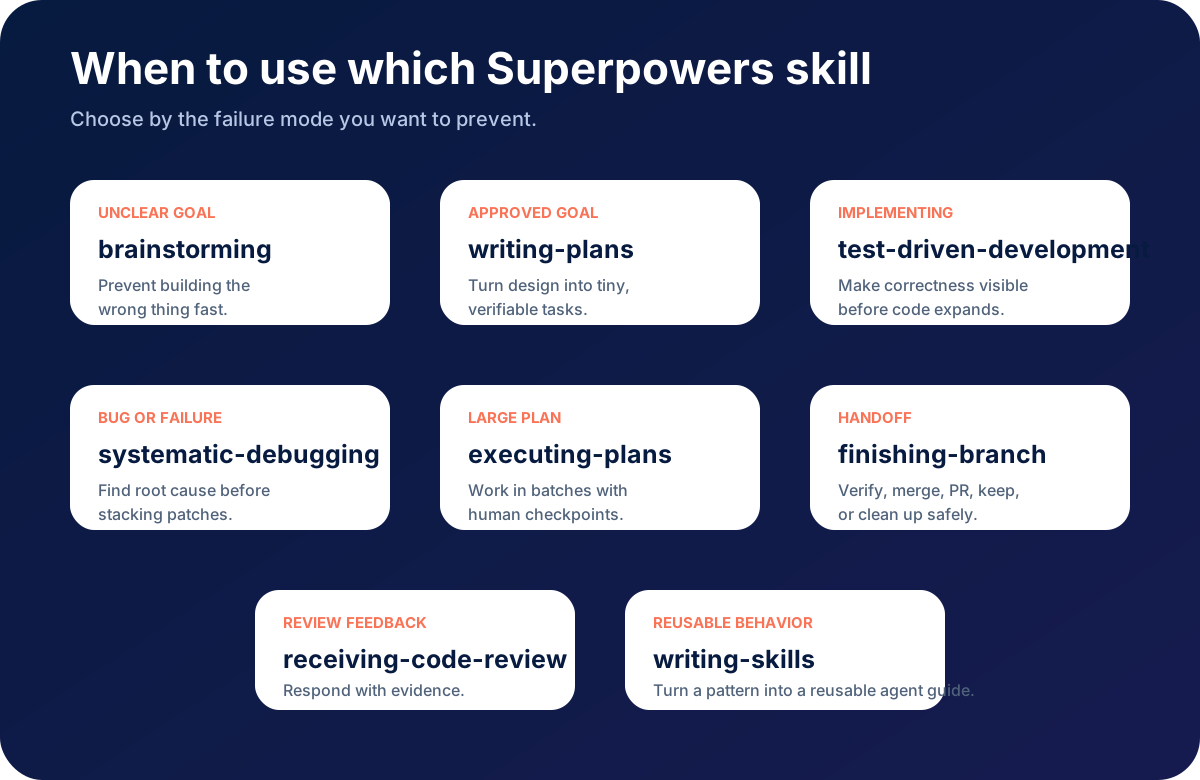
Use Superpowers when the task has real engineering risk
The clearest signal is risk.
Use Superpowers when:
- a wrong change could break existing behavior
- there are multiple possible implementation paths
- you need to preserve user work
- the agent may edit more than one file
- tests, builds, or deployment checks matter
- the problem has an unknown root cause
- the task may take longer than one short exchange
- you need a reviewable plan or handoff
This includes most serious software work: new features, bug fixes, refactors, CI failures, migrations, integrations, and deployment changes.
When you may not need the full workflow
Not every task needs heavy process.
You probably do not need the full Superpowers workflow for:
- spelling fixes
- tiny copy changes
- read-only explanations
- formatting one known snippet
- answering a conceptual question
Even then, the agent should still preserve user changes and avoid unsupported claims. Small does not mean careless.
Skill selection: which skill fits which situation?
Superpowers becomes easier to understand when you choose skills by failure mode. Ask: what mistake are we trying to prevent?
Use brainstorming when the goal is unclear
Use brainstorming when the user’s request is rough, product-oriented, or open-ended.
Good triggers:
- “Build me a dashboard.”
- “Add monetization.”
- “Make this tool better.”
- “Create a course page.”
- “I want users to convert more.”
The risk is building the wrong thing quickly. Brainstorming helps the agent ask better questions, explore alternatives, and present design decisions before code.
Use writing-plans when the goal is approved but execution is not mapped
Use writing-plans after the design is clear but before editing files.
Good triggers:
- more than one file will change
- the implementation has dependencies
- there are tests to add
- another developer may review the work
The risk is implementation drift. A plan gives the agent a track to follow.
Use using-git-worktrees when isolation matters
Use using-git-worktrees when work should happen away from the main workspace.
Good triggers:
- larger feature branches
- risky refactors
- experiments
- parallel agent work
- changes that may need to be discarded
The risk is mixing unrelated work or making rollback difficult.
Use test-driven-development when behavior changes
Use test-driven-development when the agent is implementing behavior, fixing a bug, or refactoring logic.
Good triggers:
- “Add validation.”
- “Fix this calculation.”
- “Refactor this parser.”
- “Prevent this regression.”
The risk is fake confidence. TDD makes the agent prove the behavior before and after the change.
Use systematic-debugging when something is wrong
Use systematic-debugging for bugs, failures, and unexpected behavior. The Superpowers debugging skill emphasizes root-cause investigation before fixes; see systematic-debugging/SKILL.md.
Good triggers:
- failing tests
- production bugs
- build failures
- broken integrations
- intermittent behavior
- repeated failed fixes
The risk is patch stacking. The agent may keep applying plausible fixes without understanding the system.
Use verification-before-completion before any “done” claim
Use this whenever the agent is about to finish.
Good triggers:
- “It should work now.”
- “I pushed it.”
- “The fix is complete.”
- “Ready to deploy.”
The risk is confusing edited code with verified behavior.
A proper completion report should say what was tested, what passed, and what remains unverified.
Use executing-plans for long sequential work
Use executing-plans when you already have a plan and the tasks depend on each other.
Good triggers:
- migrations
- page redesigns
- multi-step feature builds
- cleanup plans
- staged refactors
The risk is losing the sequence. Batch execution with checkpoints keeps the agent aligned.
Use subagent-driven-development for independent work streams
Use subagent-driven-development when tasks are independent and your environment supports subagents.
Good triggers:
- multiple isolated components
- parallel test-writing and implementation review
- large codebase inspection
- independent issue fixes
The risk is context overload. Independent agents can keep task context smaller and review each other’s work.
Use requesting-code-review before handoff
Use requesting-code-review when work is more than trivial.
Good triggers:
- PR preparation
- high-risk change
- unfamiliar codebase
- complex UI or API behavior
The risk is missing quality problems because the code merely compiles.
Use receiving-code-review when feedback arrives
Use receiving-code-review when a human or reviewer comments on the work.
Good triggers:
- PR review feedback
- inline comments
- requested changes
- architecture concerns
The risk is addressing comments mechanically without understanding the reviewer’s point.
Use finishing-a-development-branch when implementation is complete
Use this when the coding work is done and the next decision is operational.
Good triggers:
- merge or PR decision
- keep/discard branch decision
- deployment handoff
- cleanup after a worktree
The risk is leaving work in an unclear state.
Use writing-skills when the same agent mistake repeats
Use writing-skills when you want to turn a repeated pattern into reusable agent behavior. Superpowers’ guide treats skill-writing like test-driven development for process documentation; see writing-skills/SKILL.md.
Good triggers:
- “The agent keeps skipping this.”
- “We always need to remind it.”
- “This process applies across projects.”
- “Our team has a standard way to do this.”
The risk is relying on memory instead of making the workflow reusable.
Use cases by role
Solo developer
Use Superpowers to reduce cleanup. The biggest value is forcing the agent to plan, test, and verify before claiming success.
Startup founder
Use Superpowers when building MVP features, landing pages, tools, and internal dashboards. It helps turn business intent into implementation steps.
Agency or development team
Use Superpowers to standardize how agents work across client projects. Skills can encode review standards, deployment rules, and debugging habits.
Open-source maintainer
Use Superpowers for issue triage, PR review, regression tests, and branch hygiene.
AI-heavy builder
Use Superpowers to keep long autonomous sessions from drifting. The longer the session, the more valuable process becomes.
A general skill for all coding agents
Superpowers itself is a rich framework. But sometimes you want a smaller, platform-neutral skill that can be used by any coding agent.
We created a downloadable starter skill for that purpose:
Download disciplined-coding-agent/SKILL.md
The skill is intentionally general. It tells the agent to understand scope, inspect before editing, plan small, debug by root cause, test before completion, and report with evidence.
Use it with Claude, Codex, Cursor-style agents, Gemini CLI, OpenCode, or any environment that supports markdown-based agent instructions.
How to install the general skill
The exact path depends on your tool, but the idea is simple:
- Create a skills directory if your agent supports one.
- Add a folder named
disciplined-coding-agent. - Save the downloaded file as
SKILL.md. - Restart or refresh your agent session if required.
- Ask the agent to use the skill for implementation, debugging, and verification tasks.
For Codex-style environments that recognize shared agent skills, a common pattern is:
~/.agents/skills/disciplined-coding-agent/SKILL.md
For other tools, use the skill or instruction directory documented by that tool.
Final recommendation
Use Superpowers when the work matters enough that process matters.
The more complex the task, the more likely the agent needs a skill. If the agent must understand, change, test, review, and hand off software, do not rely only on a prompt.
Give the agent a workflow. That is what Superpowers is really about.