


What DJAI Tools MCP gives your AI agent
AI agents are very good at reasoning about a task, but they still need dependable tools when the task involves local files, exact token counts, structured data or an artifact such as a QR code. DJAI Tools MCP is a free, open-source Model Context Protocol server that gives compatible AI and coding agents a controlled set of practical tools running on your own computer.
Instead of uploading a document to DJAI, you choose which folders the MCP may read and write. Your agent calls an enabled tool, the local process validates the request, and the result is saved into your authorized output folder. DJAI does not host the processing and does not receive your source files.
This guide explains the complete v0.1.0 workflow: downloading the source, building it, connecting an MCP-capable agent, selecting profiles or exact tools, using all eight working commands, protecting local files, troubleshooting common problems and understanding what is planned next.
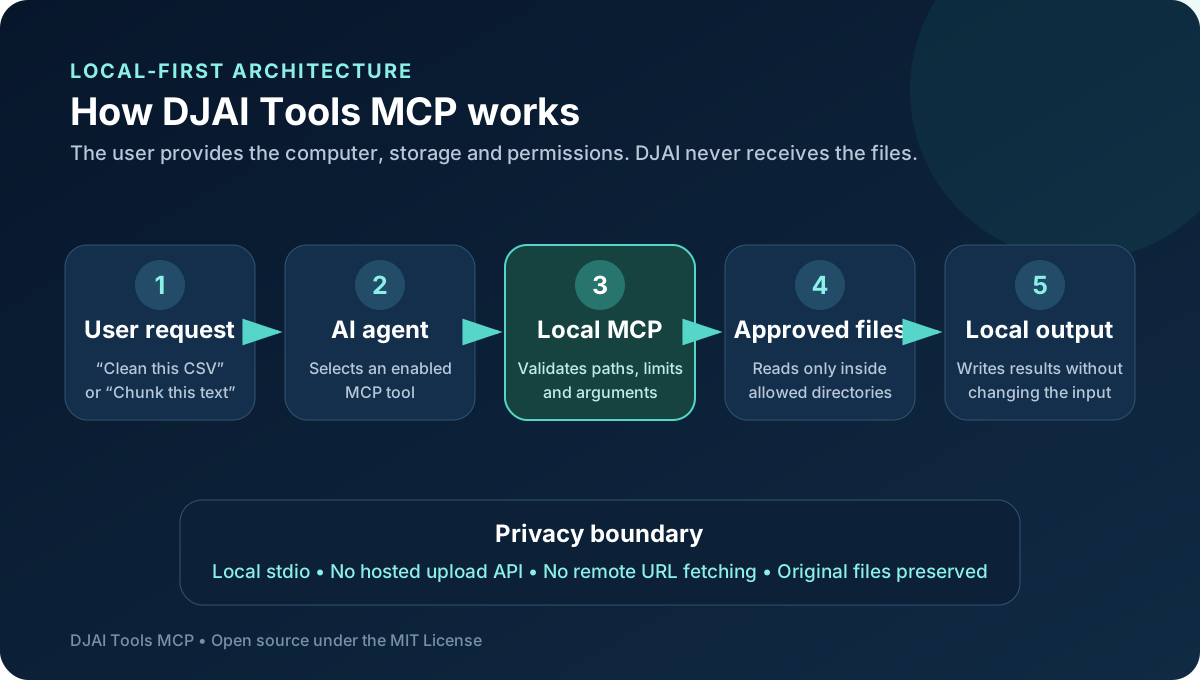
What MCP means in this project
Model Context Protocol, usually shortened to MCP, provides a standard way for an AI application to discover and call tools. A tool has a name, a description, an input schema and a structured result. This allows the agent to choose a capability based on the user's goal instead of requiring the user to manually operate a separate interface for every step.
The original free DJAI browser tools remain useful when a person wants to open a page, select a file and download a result. DJAI Tools MCP addresses a different workflow: you ask an agent to prepare context, clean data, generate an artifact or complete a repeatable sequence, and the agent calls narrowly described local tools on your behalf.
The current server communicates over local stdio. The agent launches a Node.js process and exchanges MCP messages with it. It is not a public web API, it does not open a file-upload service, and it should not be exposed directly to the internet.
What works in v0.1.0 today
The current release provides eight tested MCP tools. Four prepare material for AI workflows, three transform CSV or JSON data, and one produces local SVG QR codes.
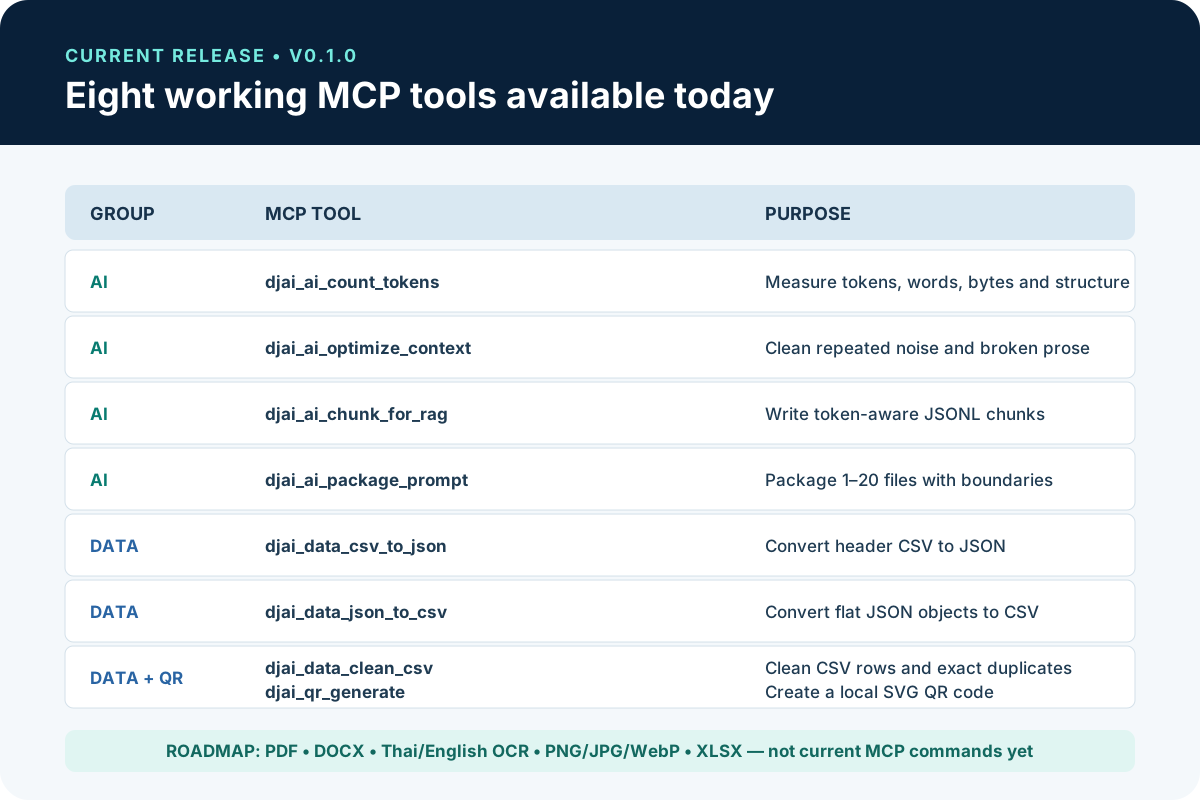
The working tools are:
- djai_ai_count_tokens measures tokens, words, graphemes, UTF-8 bytes, lines and paragraphs.
- djai_ai_optimize_context removes repeated page furniture, broken prose wrapping, English hyphenation breaks and excess whitespace.
- djai_ai_chunk_for_rag creates deterministic token-aware JSONL chunks with configurable overlap.
- djai_ai_package_prompt combines one to twenty local text files using Markdown or XML boundaries.
- djai_data_csv_to_json converts a UTF-8 header-based CSV into a formatted JSON array.
- djai_data_json_to_csv converts a top-level array of flat JSON objects into CSV.
- djai_data_clean_csv trims headers and values, removes empty rows and removes exact duplicate rows.
- djai_qr_generate writes an SVG QR code from text, a URL, Wi-Fi payload or another identifier.
PDF conversion, DOCX conversion, Thai-English OCR, PNG/JPG/WebP processing and XLSX tools are part of the staged roadmap. They already exist in the separate browser-tool collection, but they are not working MCP commands in v0.1.0. This distinction matters when you configure an agent or evaluate whether the current release fits your workflow.
Before installing
You need Node.js 22.13 or newer, npm, Git and an MCP-capable AI or coding agent. The source repository contains examples for Claude Desktop, Codex, Cursor and VS Code. Other clients can work if they support a local stdio MCP server and allow a command with arguments.
Check your Node.js version by running node --version in a terminal. If the major version is older than 22, update Node before continuing. Also decide where the server may read input and write output. A narrow pair of folders is safer than authorizing an entire home directory.
For example, create one folder named djai-mcp-input for source material and another named djai-mcp-output for generated files. Use absolute paths in the final agent configuration because desktop applications may launch the MCP from an unexpected working directory.
Download and build from GitHub
Open a terminal and clone the repository with this command:
git clone https://github.com/lovecatisgood-sudo/AI_Agent_MCP_Tool_for_Multi_Docu_PDF_PNG_QR_File_Conversion_Processing_Capability.git
Enter the downloaded directory:
cd AI_Agent_MCP_Tool_for_Multi_Docu_PDF_PNG_QR_File_Conversion_Processing_Capability
Install the exact dependency versions recorded by the project:
npm ci
Run the complete verification suite:
npm run verify
Build the TypeScript source:
npm run build
Finally, confirm that the compiled server starts and reports its version:
node dist/index.js --version
The package name is @djai/tools-mcp and the intended future convenience command is npx -y @djai/tools-mcp. Until the npm package is actually published, the reliable installation documented by the project is the source checkout and node dist/index.js command above.
Start the MCP with safe folders
A secure manual launch looks like this:
node dist/index.js --profile core --allow-read /absolute/path/to/djai-mcp-input --allow-write /absolute/path/to/djai-mcp-output
Replace both example paths with real absolute paths on your computer. The read root controls which source files tools may open. The write root controls where generated files may be created. Existing output files are protected unless you deliberately start the server with overwrite enabled.
The default maximum file size is 25 MB. Prompt packaging accepts up to 20 files and 50 MB in total. Inline text is limited to 100,000 characters, and CSV or JSON processing is limited to 100,000 rows. These limits reduce accidental resource exhaustion and make agent behavior more predictable.
Connect the MCP to an AI or coding agent
Most MCP clients need a server name, a command and a list of arguments. For a source checkout, the command is node and the first argument is the absolute path to dist/index.js.
A conceptual configuration contains:
- Server name: djai-tools
- Command: node
- First argument: the absolute path to the built dist/index.js file
- Profile argument: --profile followed by core, ai-documents, data, qr or full
- Read argument: --allow-read followed by the authorized input folder
- Write argument: --allow-write followed by the authorized output folder
Use the tested files in the repository's examples directory for client-specific syntax.
Claude Desktop
Use the included claude-desktop.json example as the starting point. Replace every placeholder with an absolute path, save it in the configuration location used by Claude Desktop, and restart the application. After restart, confirm that the DJAI tool names appear in the available tools list before asking Claude to process a file.
Codex
Follow the repository's codex.md example. Keep the read and write roots scoped to the project or working directory you actually need. Once connected, ask Codex to list the enabled DJAI tools and confirm the selected profile before beginning a multi-step workflow.
Cursor
Use the cursor.md example and point the configuration to the compiled dist/index.js. Restart or reload Cursor after changing MCP settings. If a tool is missing, check the selected profile before rebuilding the package.
VS Code agents
Use the vscode.md example for the MCP-capable extension or agent surface you have installed. VS Code configurations vary by agent extension, so verify the exact settings location while retaining the same command, arguments and folder permissions.
Choose the smallest useful tool profile
Profiles decide which tool descriptions the agent receives. A smaller profile saves context and reduces ambiguity between unrelated tools.
The core profile is the default and registers seven broadly useful tools: token counting, context optimization, RAG chunks, prompt packaging, CSV-to-JSON, CSV cleaning and QR generation. It excludes JSON-to-CSV so that the default menu stays compact.
The ai-documents profile registers the four AI preparation tools. The data profile registers CSV-to-JSON, JSON-to-CSV and CSV cleaning. The qr profile exposes only QR generation. The full profile exposes all eight v0.1.0 tools.
You can also override profiles with exact selectors. For example, starting the server with --tools ai.count_tokens,ai.chunk_for_rag exposes only token counting and RAG chunking. Exact selection is helpful for automations that need a stable, minimal capability set.
Tool 1: Count tokens and document structure
Use djai_ai_count_tokens when you need to estimate context size before sending material to an AI model, compare a document before and after cleanup, or inspect the basic structure of a prompt or source file.
Provide exactly one of text or input_path. The default encoding is o200k_base. The tool also supports cl100k_base and p50k_base. It creates no output file and does not modify the input.
Example request to your agent:
Count the tokens in requirements.md using o200k_base. Also report words, graphemes, UTF-8 bytes, lines and paragraphs. Do not modify the file.
Use the result to decide whether the material fits the intended model context window. Token counts are tokenizer-specific estimates, so always state which encoding was used when sharing the result.
Tool 2: Optimize prose for AI context
Use djai_ai_optimize_context on extracted document prose containing repeated headers, page labels, broken English hyphenation, hard line wraps or excessive blank space. It can accept inline text or a local input path. Small results may be returned directly; larger results are written to a file.
Example request:
Optimize the prose in extracted-report.txt for AI context, save the cleaned version in the output folder, and report how much smaller it became.
Do not use this tool on source code, whitespace-sensitive configuration, poetry, legal formatting that must remain exact or other material where line breaks carry meaning. Context optimization is a cleanup transformation, not a semantic fact checker.
Tool 3: Create token-aware RAG chunks
Use djai_ai_chunk_for_rag after you have clean source text. It writes JSONL using the o200k_base tokenizer. The chunk_size value may range from 100 to 8,000 tokens. Overlap may range from zero to 4,000 tokens and must remain smaller than the selected chunk size.
Example request:
Split clean-handbook.md into 700-token RAG chunks with 100-token overlap. Write JSONL into the authorized output folder and report the number of chunks.
Chunk size should reflect your retrieval and embedding system. Smaller chunks can improve precision but may lose surrounding context. Larger chunks preserve more context but can retrieve unnecessary material. Start with a measured baseline, inspect several generated chunks and adjust instead of assuming one value works for every document.
Tool 4: Package multiple files for an agent
Use djai_ai_package_prompt when requirements, references, source snippets and instructions live in separate UTF-8 files. The tool combines one to twenty files into a single package with Markdown or XML boundaries, optional instructions and a clear output path.
Example request:
Package requirements.md, api-notes.md and schema.sql into one XML-bounded context file. Put the task instructions first, preserve each source name, and save the package in the output directory.
The tool does not determine which files are relevant for you. Ask the agent to inspect filenames and include only necessary material before packaging. This prevents duplicated or irrelevant context from consuming tokens.
Tool 5: Convert CSV to JSON
Use djai_data_csv_to_json for a UTF-8 CSV with a header row. The result is a formatted JSON array. CSV values remain strings, which prevents silent and potentially incorrect type inference.
Example request:
Convert cleaned-customers.csv to JSON, preserve every field as a string, save the result locally, and report parser warnings and row counts.
Inspect warnings before importing the result into an API or database. Inconsistent columns, unusual quoting or malformed rows can require correction at the source.
Tool 6: Convert JSON to CSV
Use djai_data_json_to_csv when the source is a top-level JSON array containing flat objects. The tool rejects non-array input and non-object rows. Nested objects and arrays are not flattened automatically.
Example request:
Convert contacts.json to CSV and report the generated columns. If nested values are present, stop and explain which fields need normalization.
This explicit limitation is safer than silently serializing complex nested structures into unpredictable spreadsheet cells.
Tool 7: Clean CSV data
Use djai_data_clean_csv to trim header names and values, remove empty rows and remove exact duplicate rows. It does not perform fuzzy matching, infer data types or decide that two similar names represent the same person.
Example request:
Clean registrations.csv, remove blank and exact duplicate rows, preserve the original file, and report the before-and-after row counts.
Run this before CSV-to-JSON when exported data contains accidental whitespace or repeated rows. For business-critical deduplication, inspect identifiers and define domain-specific matching rules separately.
Tool 8: Generate a local SVG QR code
Use djai_qr_generate to encode up to 4,096 characters as an SVG QR file. Supported error-correction levels are L, M, Q and H. Margin may range from zero to 16, width from 64 to 4,096, and dark or light colors use six-digit hexadecimal values.
Example request:
Create a 1,024-pixel SVG QR code for https://www.djai.academy/tools/en/ using error correction H, a dark navy foreground and white background. Save it in the output folder.
The tool encodes the supplied content but does not visit or validate a URL. Always review the destination and scan the final QR code with more than one device before publishing or printing it.
Workflow: prepare clean context for a coding agent
Begin by counting the source tokens. If the material contains page artifacts or broken prose, optimize it and save a new file. Count the cleaned version again to measure the reduction. Review the result, select only relevant files, then package them with clear boundaries and a concise instruction section.
An effective agent request is:
Measure the files in the input folder, identify prose documents that can safely be optimized, preserve all originals, package only the relevant requirements and references for Codex, and report every output path and token count.
This workflow separates measurement, cleanup and packaging. It gives you checkpoints instead of asking an agent to transform everything blindly.
Workflow: prepare a RAG knowledge base
Start with clean, readable source text. Run context optimization only if the content is prose with repeated page noise. Count tokens, choose an initial chunk size, create JSONL chunks and inspect the beginning, middle and end of the output.
A practical first request is:
Optimize handbook.txt, count the cleaned tokens, create 700-token JSONL chunks with 100-token overlap, preserve the original and report the chunk count plus output paths.
Do not confuse chunk generation with embedding or vector-database ingestion. The current MCP prepares deterministic JSONL chunks; your chosen RAG platform handles embedding, indexing, retrieval evaluation and access control.
Workflow: clean and convert exported data
Ask the agent to clean a CSV first, report the removed rows, then convert the cleaned result to JSON. Keep the original, cleaned CSV and JSON as separate artifacts. If the JSON must later return to CSV, make sure it remains a flat array of objects.
Example request:
Clean leads.csv, remove only empty and exactly duplicated rows, convert the cleaned data to JSON, and report input rows, output rows, warnings and both generated paths.
The structured MCP results make this workflow auditable: successful operations report output paths, sizes, processing time, warnings and modifiedInput false.
Security checklist before real work
- Authorize only the folders required for the task.
- Never authorize the filesystem root, entire home directory, secrets folder or unrelated repository collection.
- Keep source and output directories separate.
- Leave overwrite disabled unless replacing an output is intentional.
- Use synthetic files when testing a new configuration.
- Review every path reported by the agent.
- Treat model-generated arguments and downloaded documents as untrusted input.
- Use a least-privilege account, container or virtual machine for hostile files.
- Do not expose the local stdio server as a network service.
- Keep dependencies updated and rerun npm run verify after upgrading.
The MCP process inherits the permissions of the account that launches it. Path validation is a strong boundary, but it does not replace operating-system permissions and careful user approval.
Troubleshooting common problems
The server does not build
Confirm Node.js 22.13 or newer, run npm ci from the repository root, then run npm run verify. Read the first failing command rather than skipping verification.
The agent cannot find DJAI Tools MCP
Use an absolute path to dist/index.js, confirm npm run build succeeded, check the client configuration file and restart the agent application. Desktop clients often do not reload MCP settings automatically.
A tool is missing
Check the selected profile. The core profile intentionally omits JSON-to-CSV. Use data or full, or select the exact tool with --tools data.json_to_csv.
The MCP rejects an input path
The canonical file path must be inside an allowed read root. Move the source into the approved input folder or restart the MCP with a narrow additional root. Do not solve the error by authorizing your entire home directory.
The MCP refuses to write a result
The destination's parent must exist inside the allowed write root. The output may also already exist while overwrite protection is active. Choose a new file name unless replacement is deliberate.
CSV or JSON conversion fails
Confirm UTF-8 input and the required structure. CSV needs a header row. JSON-to-CSV needs a top-level array of flat objects. Nested structures must be normalized first.
A QR code scans to the wrong destination
The MCP encodes exactly what it receives. Review the payload, include the complete URL scheme where appropriate, regenerate the file and test it on multiple devices.
What is coming next
The roadmap proposes PDF merge, split, rotate and watermark operations; PDF text and AI Markdown extraction; local Thai-English OCR; DOCX conversion; PNG, JPG and WebP processing; PDF-to-image and image-to-PDF workflows; and CSV/XLSX conversions.
Until those MCP phases are released, use the existing DJAI PDF tools, image tools, document and OCR tools and spreadsheet tools directly in your browser. Those browser tools process files on the user's device and are separate from the current MCP command set.
Free and open source under the MIT License
DJAI Tools MCP is published under the MIT License. You may use, copy, modify, merge, publish, distribute, sublicense and sell copies, including as part of commercial work, provided the copyright and permission notice remains in copies or substantial portions.
Visible credit is appreciated but not required by the MIT License. The license does not grant trademark rights or permission to present a modified fork as an official DJAI Academy product.
Start using and improving the project
Visit the DJAI Tools MCP GitHub repository, read the security documentation, build the current release and begin with a narrow profile and synthetic test files.
If the project helps your workflow, star the repository, report reproducible problems, suggest a focused capability, improve an example or contribute a tested pull request. You can also explore the free DJAI Tools hub and follow the work of Siamese Cat Dev.
The best first task is small and measurable: count a document, clean a CSV, prepare a few RAG chunks or generate one QR file. Confirm the result, understand the permissions, and expand your agent's capabilities deliberately.