

Why an MCP connection is only the beginning
Connecting an AI agent to useful tools solves the capability problem: the agent can finally count tokens, clean CSV data, create RAG chunks, package source files or generate a QR artifact. It does not automatically solve the workflow problem. The agent still needs to decide which operation belongs first, when a transformation is unsafe, what should remain untouched and what evidence proves that the job succeeded.
That is the role of an AI agent skill. A tool performs a focused action. A skill supplies a reusable operating procedure around one or more tools.
The bilingual skill collection published with DJAI Tools MCP turns four recurring local workflows into explicit playbooks: preparing extracted text for RAG, assembling context for a coding agent, cleaning ordinary CSV/JSON data and applying privacy-first file rules across supported tasks.
This article explains how to think about those skills, install them for Codex, choose the right one, write effective requests, combine workflows without losing control and evaluate the completion report. It is original editorial guidance based on the project's English skills reference, rather than a replacement copy of that reference.
The simplest mental model: toolbox versus playbook
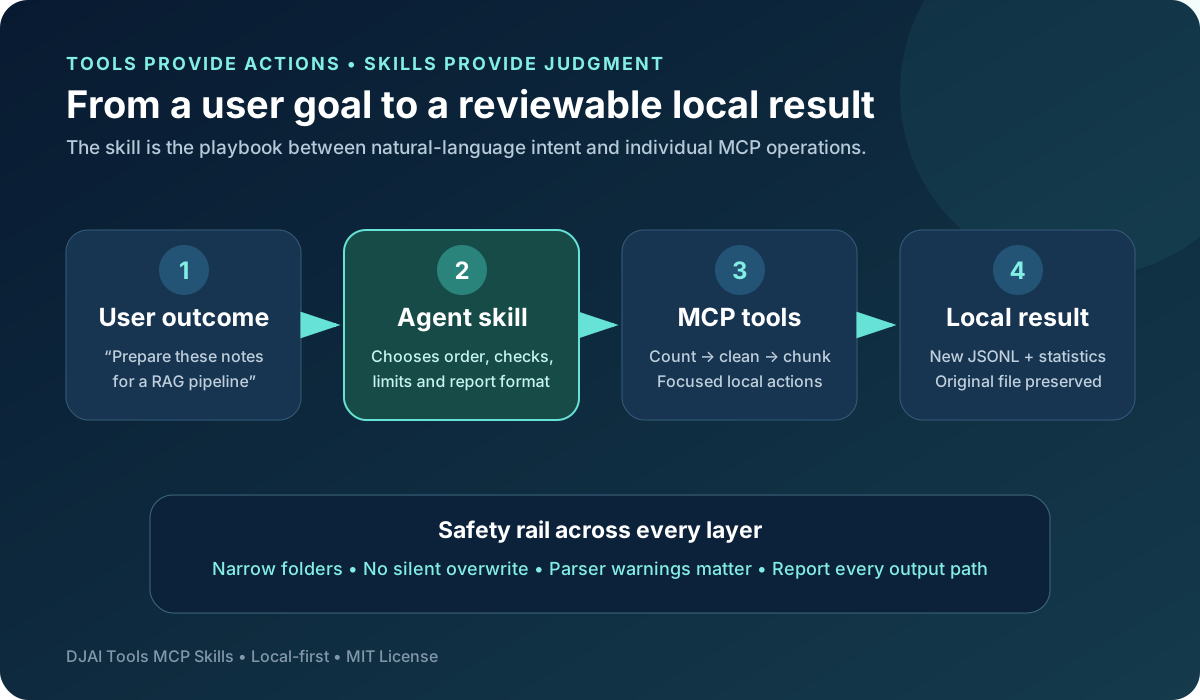
Imagine a workshop. The MCP server is the secure connection to the workshop. MCP tools are individual instruments: a ruler, a cleaner, a cutter or a packager. The skill is the laminated playbook beside the bench. It tells the operator which instrument to use, in what order, what must be checked and what a finished result should contain.
Your prompt defines the outcome. The skill interprets that outcome as a procedure. MCP tools execute the individual operations. The local filesystem contains the authorized inputs and receives new outputs.
This separation is important because tool access should not be confused with good judgment. An agent may technically be able to optimize text, but a workflow should stop it from applying prose cleanup to source code. It may be able to remove duplicate CSV rows, but a workflow should clarify that exact duplicate removal is not fuzzy customer matching. It may create JSONL chunks, but a workflow should not call those chunks a searchable vector index.
Skills turn those distinctions into reusable behavior.
How Codex discovers a skill without loading everything
Current official Codex customization documentation describes skills as reusable workflows that may contain a required SKILL.md plus optional scripts, references and assets. Codex uses progressive disclosure: it first sees skill metadata for discovery, loads the full SKILL.md only when the skill is chosen, and reads additional resources only if the workflow needs them.
This is valuable for a large agent setup. You can keep several useful workflows available without inserting every instruction into every prompt. A clear name and description help Codex choose a matching skill implicitly, while explicit invocation remains available when you want certainty.
For example, a request about preparing a Markdown handbook for RAG should naturally match document-to-rag. If you want to force that procedure, name it directly as $document-to-rag in the request.
Four skills, four different decisions
The collection is intentionally small. Each skill owns a recognizable decision rather than trying to become one universal automation prompt.
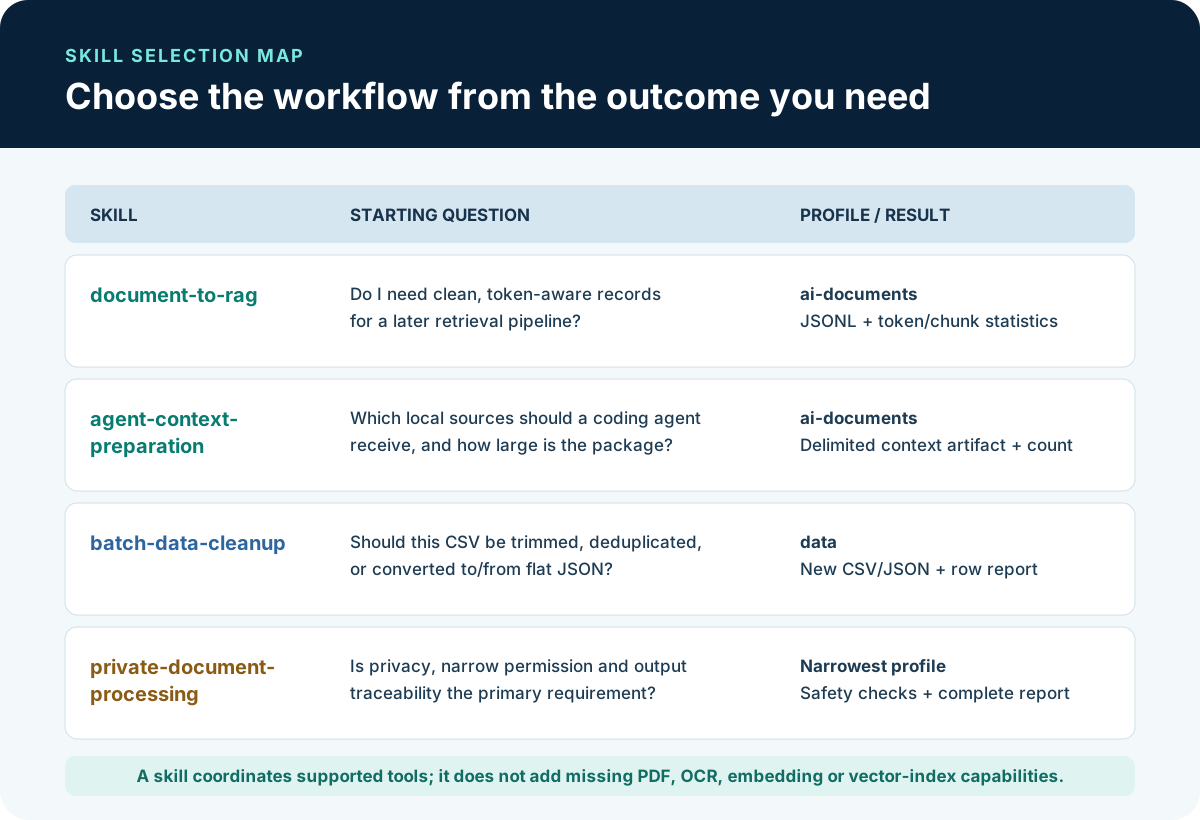
- document-to-rag answers: how should clean local text become transparent, token-aware ingestion records?
- agent-context-preparation answers: which files should an AI or coding agent receive, and how can their boundaries remain traceable?
- batch-data-cleanup answers: how should ordinary flat CSV or JSON be cleaned or converted without making hidden assumptions?
- private-document-processing answers: what privacy, permission, preservation and reporting rules should govern a supported local operation?
Choosing from the desired outcome is more reliable than choosing from a tool name. A user does not need to memorize djai_ai_chunk_for_rag before asking for a local RAG preparation workflow. The skill maps the goal to the appropriate tools and checks.
What the skill bundle supports today
The current v0.1 skill workflows operate on UTF-8 text, Markdown, CSV and flat JSON, plus locally generated SVG QR files. They coordinate the eight working tools in the current MCP release.
Native PDF conversion, DOCX conversion, OCR, PNG/JPG/WebP processing, XLSX, embedding generation and vector-database indexing are not supplied by these skills today. A skill cannot manufacture a missing tool. If the user gives a scanned PDF to document-to-rag, the correct behavior is to stop and explain that text must first be extracted using an authorized method.
This boundary is a feature. Trustworthy agent automation should state where it ends instead of quietly switching to an unapproved remote service or pretending that one output represents a later pipeline stage.
For current MCP setup, tool profiles and installation, read the separate complete DJAI Tools MCP guide.
Prepare the MCP before installing skills
Skills coordinate capabilities; they do not establish the MCP connection. Before copying a skill folder, complete these checks:
- Clone and build DJAI Tools MCP.
- Connect the compiled local stdio server to Codex or another compatible agent.
- Configure narrow absolute paths for --allow-read and --allow-write.
- Choose the smallest MCP profile that contains the required tools.
- Confirm the client can list the expected djai_* tools.
- Test one harmless operation with synthetic data.
If Codex can see a skill but not its required tool, the skill cannot complete the workflow. Fix the MCP configuration or selected profile instead of rewriting the skill to bypass the restriction.
Install skills globally or for one repository
Codex recognizes global skills under ~/.agents/skills and repository-specific skills under .agents/skills. Global installation is appropriate when you want the workflow across many projects. Repository installation is better when a team wants the workflow versioned with one codebase.
Copy the complete directory for each skill. Do not copy only SKILL.md because a skill may later add references, scripts, templates or other assets that belong to the workflow.
For a global installation, create ~/.agents/skills and copy the desired directories from the cloned MCP repository. For example:
- cp -R skills/document-to-rag ~/.agents/skills/
- cp -R skills/agent-context-preparation ~/.agents/skills/
- cp -R skills/batch-data-cleanup ~/.agents/skills/
- cp -R skills/private-document-processing ~/.agents/skills/
For one repository, create .agents/skills inside that project and copy only the workflows the project needs. A RAG prototype might include document-to-rag and private-document-processing while leaving data conversion skills out.
Start a new Codex session after installation. Use the skill browser if available, or ask Codex which matching skills it discovered. Keeping the installation narrow makes it easier to review which procedures can influence a task.
Skill 1: document-to-rag as a preparation contract
The important word is preparation. document-to-rag produces deterministic JSONL records from already extracted UTF-8 text or Markdown. It does not generate embeddings, operate a vector database or evaluate retrieval quality.
The workflow begins by validating the source type and path. It measures token size, decides whether prose cleanup is justified, generates chunks and reports the settings plus warnings. A practical starting point is 700 tokens with 100-token overlap, but that is a baseline for inspection, not a universal law.
Use this skill when:
- Text has already been extracted into .txt or Markdown.
- You need repeatable chunk boundaries for a later ingestion stage.
- You want token and chunk statistics recorded with the output.
- Source preservation and local processing matter.
Avoid this skill when:
- The source is still a PDF, image or DOCX that requires extraction.
- Exact formatting or line structure must remain untouched.
- You expect embeddings, semantic retrieval or a finished chatbot.
- A remote conversion service would be required without explicit authorization.
A strong request describes both the target and the proof of completion:
$document-to-rag prepare handbook.md as local JSONL using 700-token chunks and 100-token overlap. Preserve the source, skip cleanup if formatting is meaningful, and report the output path, source token count, chunk count, settings and warnings.
After completion, inspect several records from the beginning, middle and end. Chunk count alone does not prove useful retrieval boundaries.
Skill 2: agent-context-preparation for cleaner handoffs
Coding agents often receive too much context: generated folders, stale notes, secrets, binaries, duplicated requirements and files unrelated to the current bug. agent-context-preparation turns source selection into a deliberate step.
The skill builds one traceable artifact from selected UTF-8 requirements, code, notes or documentation. It can count unusually large sources, optimize prose when safe, package content with Markdown or XML boundaries and count the final package.
Markdown boundaries are easy for humans to review. XML boundaries are useful when robust machine-readable source separation matters. In both cases, retaining source names makes the final artifact easier to audit.
Use this skill for:
- Coding-agent handoffs
- Implementation briefs
- Bug investigation packets
- Architecture reviews
- Requirements plus selected code references
- Token reduction before a long agent session
A good request states what to include and what to exclude:
$agent-context-preparation build one XML-bounded context artifact for the authentication bug from REQUIREMENTS.md, src/auth.ts and docs/session-notes.md. Exclude secrets, generated output and unrelated files. Do not clean code or invent requirements. Report included sources, output path and final token count.
The final report should make omissions visible. A package should not be described as complete if a user-designated source could not be read or was excluded without explanation.
Skill 3: batch-data-cleanup for explicit data transformations
Small CSV tasks are easy to describe vaguely and easy to get subtly wrong. “Clean this customer file” might mean trim whitespace, delete blank rows, merge near-duplicate people, normalize phone numbers or infer dates. The current skill intentionally supports only the transformations its tools can report precisely.
It can trim headers and values, remove empty rows, remove exact duplicate rows, convert a header-based CSV to a JSON array and convert a top-level array of flat JSON objects to CSV. CSV values remain strings. Nested JSON is not flattened automatically.
Before cleaning, the workflow should consider whether whitespace or repeated rows carry meaning. Two identical transaction rows might be valid separate events. Removing them without asking could destroy data.
Use a request such as:
$batch-data-cleanup inspect orders.csv, preserve the original, trim headers and values, remove empty rows, but ask before deleting exact duplicates. Write a new CSV, then convert that result to JSON and report rows, columns, removed records, parser warnings and both output paths.
Do not describe exact-match removal as entity resolution, fuzzy deduplication or record linkage. Those are separate data problems requiring identifiers, matching rules and usually human review.
Skill 4: private-document-processing as an oversight layer
private-document-processing is different from the three specialized workflows. It is a safety and reporting discipline for any supported v0.1 operation where privacy is central.
It asks the agent to identify source and destination paths, confirm allowed roots, select the narrowest tool, preserve originals, inspect structured result fields and report every created file without exposing sensitive content merely to demonstrate success.
Use it when:
- The input contains private business or personal information.
- You want an explicit confirmation of read and write boundaries.
- Silent overwrite must be prevented.
- Completion must include paths, sizes, warnings and modifiedInput status.
- Another specialized skill needs stronger privacy instructions.
An effective prompt could be:
Use $private-document-processing with $agent-context-preparation. Work only inside the configured local folders, package policy.md and private-notes.md, preserve both inputs, do not quote their contents, and report the exact artifact path, source count, warnings and modifiedInput result.
This skill cannot make an operating-system account safer than its actual permissions. Narrow MCP roots, a least-privilege account and user review remain important.
How to combine two skills without creating confusion
Combining skills is useful when one provides the main transformation and another provides oversight. document-to-rag plus private-document-processing is a natural pair: one owns chunk preparation, while the other reinforces local boundaries, preservation and completion reporting.
Avoid combining every skill in one request. agent-context-preparation and document-to-rag produce different artifacts for different downstream uses. If you need both, ask for separate outputs and describe why each exists.
A clear combined request has four parts:
- Outcome: what artifact should exist at the end?
- Sources: which exact files are in scope?
- Constraints: what must remain local, unchanged or excluded?
- Evidence: which counts, paths and warnings must be reported?
This structure reduces improvisation and makes the completion message easier to evaluate.
A completion report is part of the product
Agent automation should not end with “Done.” For local file work, the report is how the user reviews scope and detects mistakes.
Depending on the workflow, expect:
- The selected skill and MCP profile
- Source paths or source names
- Every created output path
- Token, chunk, row, column or file counts
- Chosen chunk size, overlap or package boundary
- Parser and processing warnings
- Confirmation that original inputs were preserved
- modifiedInput status when provided by the tool
- Clear statements about skipped or unsupported steps
Sensitive content does not need to be pasted into the response to prove that a count or transformation succeeded. Metadata and paths are usually sufficient.
Common failure modes and what they reveal
Codex sees the skill but cannot call djai_* tools
The procedure is installed, but the capability layer is missing or the active MCP profile is too narrow. Verify the local server connection and tool list.
Codex sees the tools but ignores the skill
Start a new session after installation and invoke the workflow explicitly with $skill-name. A precise task description also improves implicit matching.
The server rejects a path
Treat that rejection as a protection, not an inconvenience. Move the file into an authorized folder or deliberately restart with a narrow additional root. Do not bypass the boundary through symlinks, shell copies or another service.
The workflow stops on a PDF or image
That is correct for v0.1. The skill works with extracted UTF-8 text, not native PDF, OCR or image input. Use the DJAI browser document tools when appropriate, then review the extracted text before a local skill workflow.
RAG JSONL is created but cannot be searched
Chunking is a preparation stage. Search requires a separately selected embedding model, index, retrieval system and evaluation process. The skill should never imply that these later stages already happened.
Questions readers often ask
Do I need skills to use DJAI Tools MCP?
No. MCP tools can be called directly. Skills become valuable when a task repeats, uses multiple operations or needs consistent safety and reporting rules.
Should I install all four skills globally?
Only if you expect to use them across projects. Repo-specific installation provides clearer scope for team workflows and lets the project version the exact skill instructions it relies on.
Can another agent use these workflows?
The procedure can inspire other clients, but skill formats and discovery locations vary. Keep the MCP connection and adapt the workflow using that agent's official documentation rather than assuming Codex directories apply everywhere.
Can a skill make an unsupported MCP feature work?
No. A skill coordinates existing capabilities. It should stop at unsupported formats or stages and explain the missing requirement.
Are the skills free for commercial use?
The project and skills are published under the MIT License. Use, modification and commercial distribution are permitted under its terms, including retention of the required copyright and permission notice.
Build better agent habits, not just longer tool lists
The strongest message behind this skill collection is that useful agents need more than access. They need bounded procedures, honest limitations, preserved inputs and evidence-rich completion reports.
Start by installing one skill for one recurring task. Use synthetic material, review its tool calls and verify the output. When the procedure behaves predictably, make it part of the project or user-level setup that matches its real scope.
Explore the English skill guide on GitHub, read the DJAI Tools MCP repository, and review the current Codex skills documentation before installing.
The skills are free, local-first and open source under the MIT License. Stars, reproducible issues, safe examples, Thai and English documentation improvements, tests and focused contributions all help build a more useful agent-tooling ecosystem for the DJAI community and other vibe coders.