


A new open-source tool from the DJAI community
A DJAI community member and the developer behind Siamese Cat Dev has published DJAI Tools MCP, a free, local-first Model Context Protocol server designed to give AI agents and coding agents practical file and data capabilities on the user's own computer.
The project is available publicly on GitHub under the MIT License. Developers, vibe coders, students, automation builders and businesses may inspect the source, use it, modify it, create forks and contribute improvements under the terms of that license.
The first v0.1.0 release focuses on a trustworthy foundation rather than claiming every planned feature is already complete. Eight tested MCP tools work today for token measurement, AI-context cleanup, RAG chunking, prompt packaging, CSV/JSON transformation, CSV cleaning and SVG QR generation. PDF, OCR, DOCX, PNG/JPG/WebP and XLSX capabilities are planned in later phases.
Why this project was created
DJAI Academy and Siamese Cat Dev previously released a broad collection of free private browser tools covering PDF operations, image conversion and compression, Thai-English OCR, DOCX conversion, QR creation, AI token and RAG preparation, CSV, JSON and Excel workflows.
Those browser tools are helpful when a person wants to open a page and process a file manually. AI and coding agents create another opportunity: the user can describe the desired outcome, and the agent can select a narrowly defined tool, execute it, inspect the structured result and continue to the next step.
The central question became: how can agents gain these capabilities without turning DJAI into a hosted file-processing service and without asking users to send private documents to someone else's server?
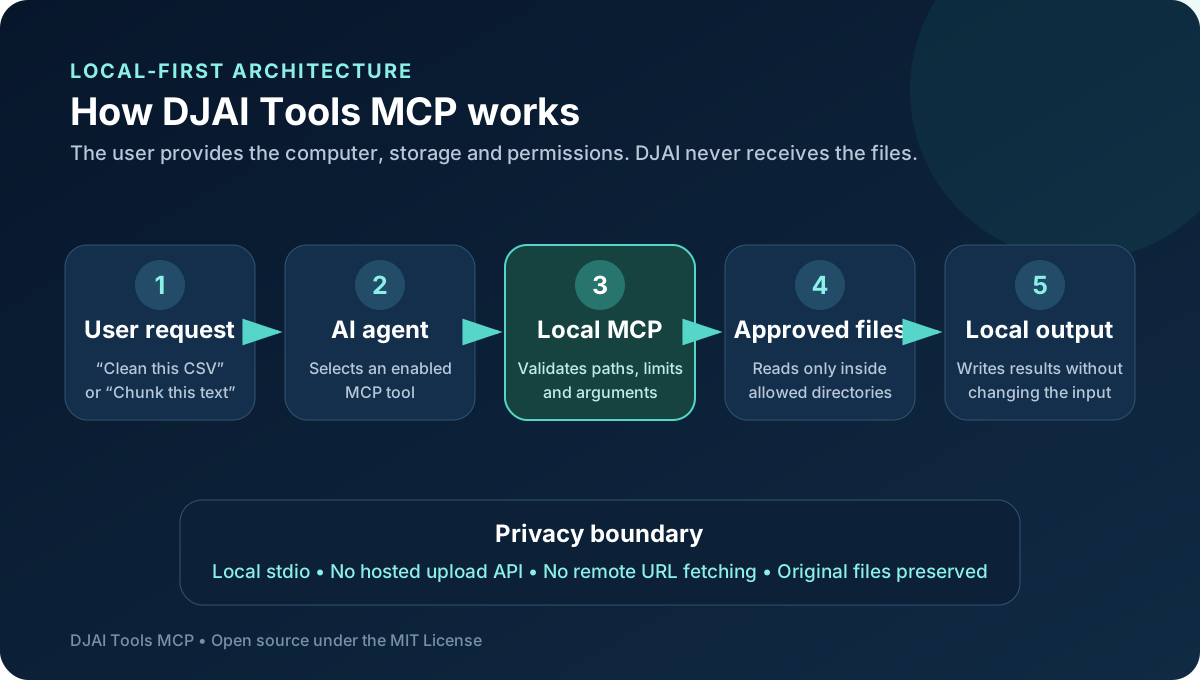
The answer is a local MCP server. The user downloads the open-source project, chooses the tools or profile they want, and grants access only to selected folders. Their own computer performs the work and stores the output.
Local-first instead of hosted processing
DJAI Tools MCP currently communicates through local stdio. The compatible AI application launches the MCP process and calls enabled tools. There is no DJAI upload API behind the conversion. The server does not fetch arbitrary remote URLs and does not create shell commands from model-provided input.
This architecture has benefits for both users and maintainers:
- Documents and data remain on the user's machine.
- Users control which directories may be read and written.
- Source files are preserved by default.
- DJAI does not pay to process or temporarily store community files.
- The project works independently of a hosted conversion endpoint.
- Developers can audit the code and propose security improvements.
- Teams can use a narrow capability profile instead of exposing every tool.
Local processing is not automatically risk-free. An MCP process inherits the permission of the account that launches it, so users should authorize narrow folders and avoid a whole home directory, filesystem root, cloud-sync root or secrets collection. The repository includes a documented security model and conservative default limits.
Eight tools available in the first release
The v0.1.0 release includes four AI preparation tools, three data tools and one QR tool.
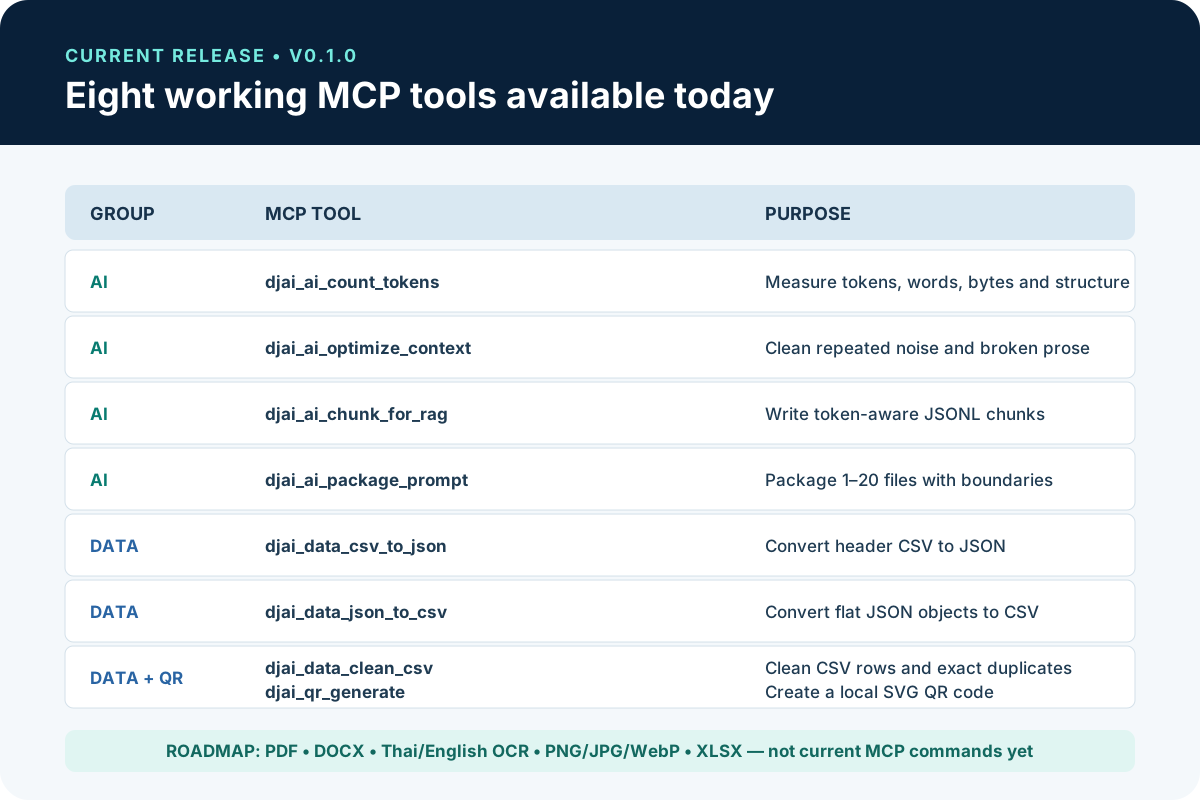
The current tools allow an agent to:
- Count tokens, words, graphemes, bytes, lines and paragraphs using common tokenizer encodings.
- Remove repeated page lines, broken prose wrapping and excess whitespace from appropriate text.
- Build deterministic JSONL chunks for RAG with configurable size and overlap.
- Combine up to twenty local UTF-8 files with Markdown or XML boundaries.
- Convert header-based CSV data into formatted JSON while preserving values as strings.
- Convert a flat array of JSON objects into spreadsheet-friendly CSV.
- Trim CSV values and remove empty or exactly duplicated rows.
- Generate a local SVG QR code from text, URLs, Wi-Fi payloads or identifiers.
Every successful operation returns structured information such as output paths, sizes, processing time, warnings and whether the original input changed. The design goal is to make agent actions understandable and auditable rather than hiding file mutations behind a vague response.
Smaller profiles help agents choose well
The project lets users enable all current tools or select smaller groups. The core profile registers seven broadly useful capabilities. The ai-documents profile includes token count, context optimization, RAG chunks and prompt packaging. The data profile contains CSV and JSON tools, while qr exposes only QR generation. The full profile registers all eight tools.
Exact selectors provide even tighter control. A user building one RAG workflow can expose only token counting and chunk generation. A data automation can expose only CSV cleaning and CSV-to-JSON. Smaller menus reduce tool-description context and make selection less ambiguous.
What this means for vibe coders
Vibe coding becomes more useful when agents can do more than produce code in a chat window. A local tool server lets the agent prepare inputs and outputs around the coding task.
A vibe coder can ask an agent to measure a long specification before adding it to context, package only relevant source files, clean a CSV export before generating an import script, or create deterministic RAG chunks for a prototype knowledge base. The human still controls permissions and reviews results, while the agent handles repeatable mechanical steps.
This is also an educational project. Its source demonstrates MCP tool definitions, Zod input validation, profile-based registration, structured results, local filesystem boundaries, tokenization, CSV parsing, QR generation, TypeScript tests and cross-platform packaging decisions.
Free under the MIT License
The repository uses the MIT License, one of the most permissive common open-source licenses. Under its terms, people may use, copy, modify, merge, publish, distribute, sublicense and sell copies of the software, including within commercial or closed-source products.
The copyright and permission notice must remain in copies or substantial portions. The software is provided without warranty. Visible credit to DJAI Academy or Siamese Cat Dev is warmly appreciated but not required by the MIT License.
The license does not grant trademark rights. A modified fork should not imply that it is an official DJAI Academy release or that DJAI endorses the modified product without permission.
A community project designed for contribution
Open source is more than publishing a ZIP file. The repository contains an English and Thai README, tool and profile documentation, security guidance, contribution instructions, a code of conduct, support information, an attribution guide, tests, CI configuration and a staged roadmap.
Community members can contribute in several ways:
- Test the project on Windows, macOS or Linux.
- Improve setup instructions for an MCP-capable agent.
- Report a reproducible bug using synthetic files.
- Add regression tests for parsing and filesystem boundaries.
- Improve Thai or English documentation.
- Propose a narrowly scoped tool with a clear security model.
- Review code or dependency changes.
- Share an example workflow without including confidential data.
Good open-source participation does not require writing a large feature. A precise bug report, a corrected configuration example or a test covering a platform-specific problem can be highly valuable.
The roadmap: PDF, OCR, images and documents
The longer-term goal is to adapt more of the original browser-tool capability for local agents. Planned phases cover common PDF operations, PDF text and AI Markdown extraction, DOCX conversion, Thai-English OCR, PNG/JPG/WebP image conversion and compression, PDF-to-image, image-to-PDF and XLSX workflows.
These items are a roadmap, not current v0.1.0 MCP commands. The project intentionally labels them accurately so users can trust the documentation. People who need those capabilities today can use the original PDF tools, image tools, document and OCR tools and spreadsheet tools in their browser.
How to try DJAI Tools MCP
The current source installation requires Node.js 22.13 or newer, npm and Git. Clone the GitHub repository, run npm ci, run npm run verify, build with npm run build and connect the compiled dist/index.js to an MCP-capable client using absolute paths and narrowly authorized folders.
For a detailed explanation of profiles, security, all eight commands and complete workflows, read the comprehensive DJAI Tools MCP guide.
Start with synthetic files and one small workflow. Confirm the Agent can list the enabled tools, verify its input and output directories, then try token counting, CSV cleaning, RAG chunking or QR generation.
Support the release
Visit the DJAI Tools MCP repository on GitHub. If the idea is useful, star the repository so more builders can discover it. Read the documentation, try the current tools, share honest feedback and open an issue when you can provide clear reproduction steps.
Developers can fork the project or submit focused pull requests. Educators and community members can improve examples and translations. Agent users can contribute client-specific setup notes and safe workflow patterns.
DJAI Academy wants the community to learn by building, publishing and improving practical technology together. This release is one example of how a community idea can grow from free browser utilities into open infrastructure that other vibe coders can study, reuse and extend.
Follow Siamese Cat Dev, explore the DJAI Academy tools hub and watch the repository roadmap for future local PDF, OCR, document and image capabilities.