


What does it mean to give Claude Superpowers?
Claude is already strong at reading code, explaining systems, writing patches, and helping developers move quickly. But raw intelligence is not the same as reliable engineering behavior.
Giving Claude Superpowers means adding a structured development methodology around the model. Instead of letting the agent jump directly from request to code, Superpowers gives it a set of mandatory skills: brainstorm before building, plan before editing, test before claiming, debug by root cause, review work, and finish branches safely.
The project is open source at obra/superpowers. Its README describes Superpowers as a complete software development methodology for coding agents, built on composable skills and startup instructions. It supports Claude Code, Codex, Cursor, Gemini CLI, OpenCode, Kimi Code, and other agent environments.
The important point: Superpowers is not just a plugin. It is a way to make the agent behave more like a disciplined development partner.
The problem Superpowers is solving
Most coding-agent failures are not typing failures. They are process failures.
A normal agent can produce a lot of code quickly. That is useful, but speed becomes dangerous when the agent:
- starts implementation before understanding the goal
- edits a broad area without isolating scope
- writes code before tests
- fixes symptoms without finding root cause
- declares success without verification
- loses track of the plan during a long session
- forgets to preserve user changes
Superpowers attacks those failure modes directly. It gives the agent a workflow for the full development cycle.
The core workflow
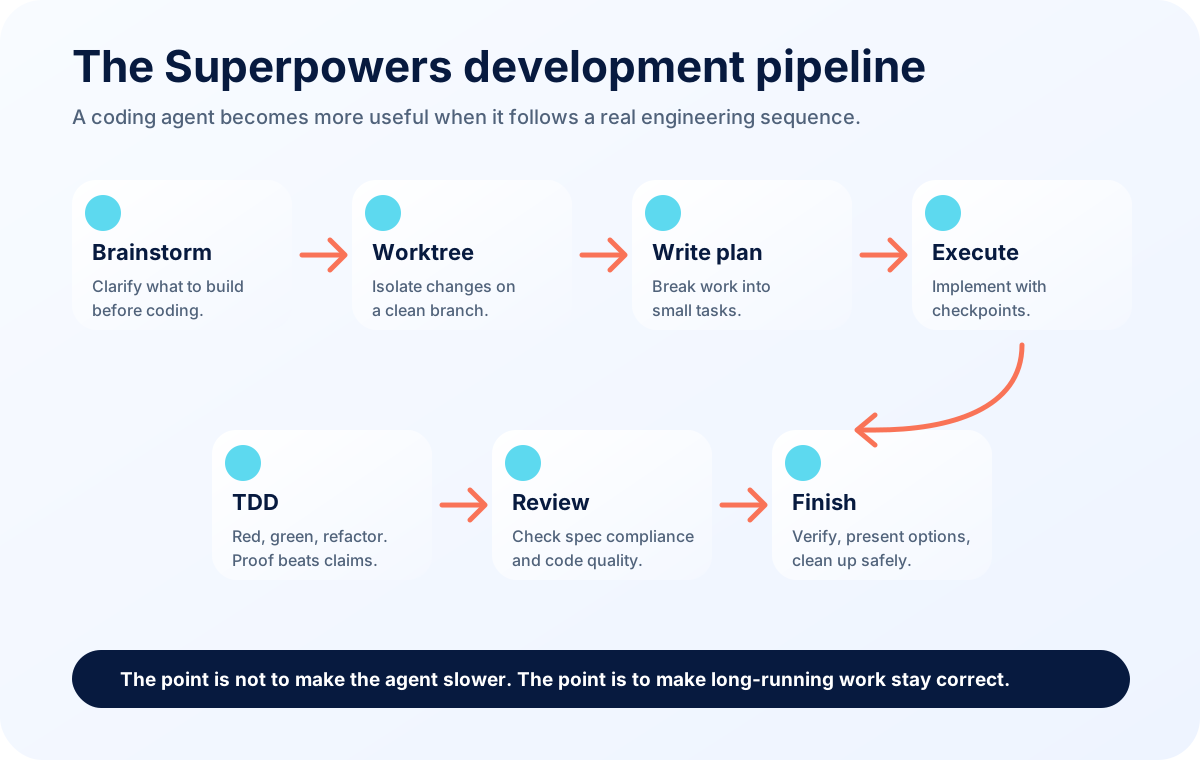
The basic Superpowers workflow listed in the repo is:
brainstormingusing-git-worktreeswriting-planssubagent-driven-developmentorexecuting-planstest-driven-developmentrequesting-code-reviewfinishing-a-development-branch
That sequence is important. It mirrors how a careful engineer works.
First, understand what should be built. Then isolate the work. Then write a plan. Then implement in small pieces. Then test. Then review. Then finish cleanly.
Feature 1: Brainstorming
The brainstorming skill activates before writing code. Its job is to prevent premature implementation.
This matters because users often describe a symptom, not the real goal. A user might say, “Add a popup,” but the actual goal is monetization, course promotion, or conversion tracking. If the agent codes immediately, it may build the wrong thing.
Brainstorming asks questions, explores alternatives, and presents the design in readable sections. This improves development because it shifts the agent from “obedient code machine” to “design collaborator.”
Use it when:
- the request is product-oriented
- the user is still deciding what they want
- multiple implementation paths exist
- a wrong assumption would be expensive
Feature 2: Using git worktrees
The using-git-worktrees skill creates an isolated workspace on a branch. This is especially useful when an agent may work for a long time or when multiple tasks might happen in parallel.
Isolation matters because AI coding sessions can touch many files. A worktree helps keep the main workspace clean, makes rollback easier, and allows review without mixing unrelated changes.
Use it when:
- the task is larger than a small edit
- experiments are likely
- multiple branches or agents may work in parallel
- you want a clean test baseline before implementation
Feature 3: Writing plans
The writing-plans skill turns an approved design into small implementation tasks.
This is where many agents fail. They may understand the high-level goal but still implement in a messy order. A good plan names exact files, expected changes, verification steps, and checkpoints.
Planning makes the work easier to review. It also helps the agent resume after compaction or interruption.
Use it when:
- more than one file will change
- implementation order matters
- tests need to be added
- a human may review or approve before coding
Feature 4: Executing plans
executing-plans gives the agent a disciplined way to work through the plan. Instead of editing everything at once, the agent works in batches and reports progress.
This matters because long-running agents drift. They start with a plan, then make “small improvements,” then forget the original acceptance criteria. Execution discipline keeps the agent aligned.
Use it when:
- you have an approved plan
- tasks are sequential
- human checkpoints are useful
- the work should be traceable
Feature 5: Subagent-driven development
subagent-driven-development is for decomposing work into independent tasks and using fresh context per task. In environments that support subagents, this can reduce context pollution and speed up execution.
The useful idea is not “more agents” for its own sake. The useful idea is separation of concerns. One agent can implement a task. Another can inspect for spec compliance. Another can review code quality.
Use it when:
- tasks are independent
- context is large
- parallel work is safe
- review quality matters
Feature 6: Test-driven development
The test-driven-development skill enforces red-green-refactor. Write a failing test, watch it fail, write minimal code, watch it pass, then refactor.
This is one of the most important Superpowers features because agents often over-trust their own generated code. TDD forces the agent to make correctness observable.
Use it when:
- implementing new behavior
- fixing a bug with a reproducible case
- refactoring logic
- protecting against regression
You do not need to be religious about test style to understand the value. The point is evidence. The agent should prove behavior changed intentionally.
Feature 7: Systematic debugging
systematic-debugging requires root-cause investigation before fixes. The skill explicitly rejects random patching. You can review the skill here: systematic-debugging/SKILL.md.
This matters because agents are very good at plausible fixes. They see an error and immediately patch the nearest code. Sometimes that works. Often it hides the real problem.
Systematic debugging asks the agent to observe, form one hypothesis, test it minimally, and only then fix the root cause.
Use it when:
- a test fails
- production behavior is unexpected
- a build fails
- an integration breaks
- previous fixes did not work
Feature 8: Verification before completion
verification-before-completion addresses one of the most common AI-agent problems: saying “done” too early.
In real development, completion is not a feeling. It is evidence. Did the build pass? Did the test fail before and pass after? Did the route return the expected response? Did the UI render correctly? Did deployment actually go live?
Use this skill whenever the agent is about to summarize work.
Feature 9: Requesting and receiving code review
The review skills make the agent inspect its own work and respond properly to feedback.
This matters because an agent can create code that compiles but violates product intent, accessibility, security, performance, or maintainability. A review pass gives the agent a second lens.
Use review skills when:
- the change is more than trivial
- a PR will be opened
- a human requested review feedback
- quality matters more than speed
Feature 10: Finishing a development branch
finishing-a-development-branch is about safe closure. It verifies tests, presents options, and cleans up worktree state.
This is practical. Many AI sessions end with “I changed the files.” But in real work you need to know: should we merge, open a PR, keep the branch, discard the experiment, deploy, or wait?
Use it when implementation tasks are complete and the next step is operational.
Feature 11: Writing skills
writing-skills is a meta-skill. It teaches how to create new skills. The Superpowers guide treats skill-writing like TDD for process documentation. You do not just write a skill because it sounds good; you test whether agents fail without it and improve with it. See writing-skills/SKILL.md.
This matters for teams. If your team repeatedly corrects the same agent behavior, that behavior can become a skill.
Claude before and after Superpowers
Without Superpowers, Claude can still be useful. It can answer questions, patch code, and explain systems. But the session depends heavily on the user remembering to enforce process.
With Superpowers, Claude has a stronger default path:
- clarify before building
- plan before editing
- test before confidence
- debug before fixing
- review before handoff
The tradeoff is that it may feel slower at the beginning. That is usually a good tradeoff for serious work. A few minutes of design can prevent hours of cleanup.
Best projects for Superpowers
Superpowers is most useful when the work has real complexity:
- new product features
- multi-file refactors
- CI failures
- production bugs
- migrations
- SDK integrations
- deployment changes
- codebase modernization
- agent-assisted open-source maintenance
It is less important for tiny copy edits or one-line changes, although verification still matters.
Final recommendation
If you use Claude for development, think of Superpowers as a process upgrade. The model already has capability. Superpowers gives it discipline.
That discipline is what makes AI development safer for real projects. It reduces guessing, improves traceability, and makes completion evidence-based instead of vibes-based.